
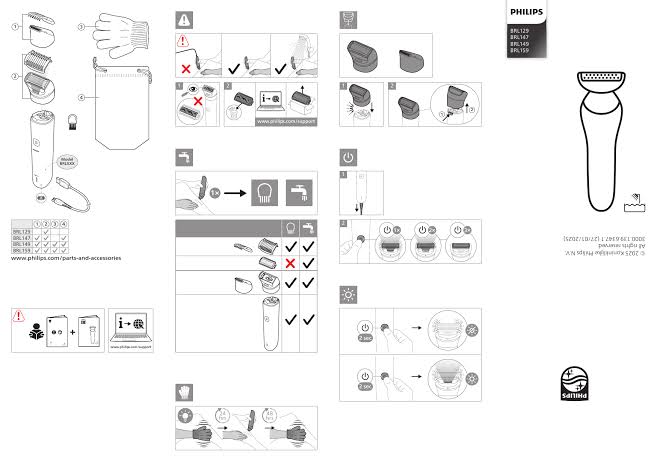
Philips is one of the broadest consumer and personal-care brands in the world: from electric shavers and toothbrushes to televisions, kitchen appliances and smart lighting. Because the range is so wide, owners very often end up in the same spot — the box is long gone and the paper manual is missing, yet the questions about modes, indicators and proper care remain.
This article covers the essentials: which categories Philips makes, what you can actually learn from the official manual, and how to find the right document fast without wading through dubious sites. We mean genuine manufacturer documentation here, not second-hand summaries from forums.
“A manual isn’t a formality in the box — it’s a map of the device, explaining what the buttons never say.”
The Philips lineup: what it covers
The Philips lineup spans several large areas. In personal care there are shavers in the Series 3000–9000 range, OneBlade trimmers, epilators and hair dryers. Oral health is covered by Sonicare brushes with various heads and modes. A separate, sizeable area is the kitchen: Airfryer air fryers, blenders, juicers, coffee machines and multicookers.
Philips is just as visible in electronics and the home: televisions with the signature Ambilight backlight, monitors, audio gear, and the Philips Hue smart-lighting ecosystem of bulbs, strips and sensors. Each of these categories ships with its own documentation set — a full user manual, a quick-start guide, and, for complex devices, service materials.
Why the official manual matters
An official manual solves several problems at once. First, safety: the manufacturer states the permitted modes, load limits and handling rules, and ignoring them leads to damage or injury. Second, it decodes the indicators — what that blinking icon on a Sonicare brush or a code on the Airfryer display actually means.
Third, the manual saves money: most so-called breakdowns are really solved by correct cleaning, a settings reset or a replaced consumable — all described in the manual. If you want reliable documents for several brands in one place, a single catalog like Manual Machine keeps guides organized by manufacturer and model.
How to quickly find a Philips manual
The easiest way to find the right document is through a dedicated library. Open Manual Machine and enter the brand — the system shows the available models and file types: user manuals, service guides, schematics. This is more reliable than random search links, which often surface outdated or incomplete PDFs.
From there, just go to the brand section. All Philips guides are collected on the Philips page, where documents are split by category and model, so you quickly find your exact shaver, television or air fryer by the model number printed on the body or on the label underneath.
Common questions from Philips owners
Where do you find a Philips model number? It’s usually printed on the back or bottom panel, on the rating plate near the power cord, or in the settings menu on televisions. Search by that code (for example, HD9200 or HX6800) rather than by the general series name.
What if the manual is only in English? For most popular Philips models localized versions exist; if there isn’t one, the English original contains the same diagrams and mode tables, which are clear without translation. Philips pictograms are standardized across the entire lineup.
Why is the shaver or brush blinking and not turning on? Most often this is a low-charge indicator or a travel lock. The exact meaning of a specific signal is always given in the “Indicators” section of your manual — and with it the issue is solved in a minute.
What documents you can find
For Philips devices, from shavers to televisions there is usually not one document but a whole set. The basic user manual describes everyday operation: switching on, modes, controls and care. A quick-start guide helps you get the device running right after purchase, without going into detail.
For more serious tasks there are service manuals and schematics: they contain the disassembly order, unit parameters and diagnostics, and are aimed first of all at technicians. Knowing which type of document you actually need saves time: a user manual is enough for setup, while a service manual comes in handy for repairs.
Where to find the Philips model number
Before you search for a manual, find the exact Philips model identifier. It’s usually printed on a rating plate — a small metal or paper tag on the body, back or bottom; on many devices the code is also visible in the settings or system information.
Don’t stop at a short name: a full model number contains suffixes that define the version and configuration. An error in a single character can lead to a manual for a different model, so it’s worth double-checking the code.
The manual within reach: why it helps
It’s worth keeping the manual for your Philips device for a simple reason: questions arise rarely but always suddenly. An error indicator, the need for a reset, or clarifying a mode — in all these cases the manual gives an answer in a minute instead of a long search.
A digital copy beats paper in every way: it can’t be thrown out by accident, it’s always with you, and it’s tied to the model number. One saved link spares you a repeat search in the future.
What the manual recommends
Correct use of Philips devices, from shavers to televisions rests on a few principles set out in the manual. Keep the device clean, don’t go beyond the recommended modes, and react to the indicators right away rather than when the problem worsens.
Following the requirements on power, connection and consumables prevents the bulk of breakdowns. The manual describes all of this for your model, and following it pays off in calm, long-lasting operation.
Can you use a manual in another language? For many popular Philips models a localized version is available, but even the English original contains the same diagrams, mode tables and pictograms. Their symbols are standardized, so the meaning is clear without translation.
What if there’s no exact manual for the model? Sometimes a document for a close model in the same series fits — the modes and units are often the same. But before using it, make sure the key specs on the device’s rating plate match.
Philips is the rare case where a single manufacturer covers half the devices in your home, so keeping current manuals handy really pays off. Find the document by your model number, bookmark it, and you’ll handle most questions about operation, care and minor repairs yourself, without a service visit.
